思科期末练习题完整命令。答案已校对更新,加入了完整命令,中文与英文注释。
制作:邢子逸
感谢:陈柯光
转发请提供出处,谢谢!
Task2
Router>
Router>enable
Router#configure terminal
Router (config)#hostname jhr #重命名路由器为jhr Hostname as jhr (must be in lowercase)
Jhr(config)#no ip domain-lookup #禁用DNS查找 Disable DNS Lookups
Jhr(config)#exit
Jhr#terminal history size 25 #命令缓冲区大小设置为25 Command Buffer size should be 25
Jhr#configure terminal
Jhr(config)#line console 0
Jhr(config-line)#logging synchronous #防止控制台会话的日志输出中断用户 Prevent the logging output of the Console session from interrupting the user while typing (do not disable the logging output)
Task3
Jhr(config-line)#exit
Jhr(config)#int f0/0 #进入f0/0端口配置第一个子网的第一个主机ip First host IP of the 1st sub-network to the Router’s interface (Fast Ethernet 0/0)
Jhr(config-if)#ip add 192.168.1.1 255.255.255.192
Jhr(config-if)#no shutdown
Jhr(config-if)#int f0/1 #进入f0/1端口配置第二个子网的最后一个主机ip Last host IP of the 2nd sub-network to the Router’s interface (Fast Ethernet 0/1)
Jhr(config-if)#ip add 192.168.1.126 255.255.255.192
Jhr(config-if)#no shutdown
Jhr(config-if)#ipv6 add 2001:db8:1:1::1/64 #分配f0/1端口的ipv6地址(已经提供) IPv6 addresses for FE01 on the Router are GUA: 2001:db8:1:1::1/64 and LLA: fe80::1
Jhr(config-if)#ipv6 add fe80::1 link-local
Jhr(config-if)#int f0/0
Jhr(config-if)#ipv6 add 2001:db8:1:2::1/64 #分配f0/0端口的ipv6地址(已经提供) IPv6 addresses for FE00 on the Router are GUA: 2001:db8:1:2::1/64 and LLA: fe80::1
Jhr(config-if)#ipv6 add fe80::1 link-local
Jhr(config-if)#exit
Jhr(config)#ipv6 unicast-routing #开启ipv6的路由功能
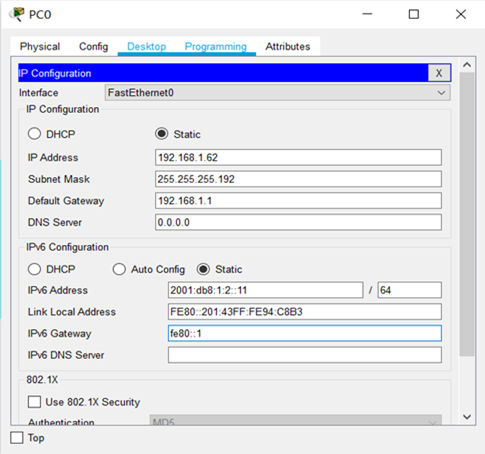
pc0
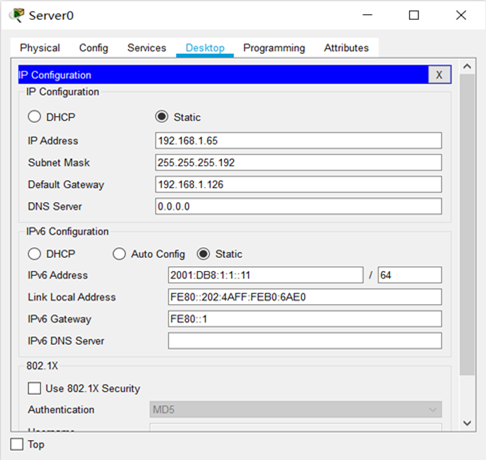
TFTP server
Task4
Switch>
Switch>enable
Switch#configure terminal
Switch(config)#line vty 0 #配置交换机的远程vty访问 Allow remote access only on VTY Line 0
Switch(config-line)#password cisco #Remote Access must be protected with a clear-text password. Do not use usernames for authentication.
Switch(config-line)#login
Switch(config-line)#exit
Switch(config)#int vlan 1 #配置VLAN1端口 Assign the 2nd Host IP of the 1st sub-network to the SVI
Switch(config-if)#ip add 192.168.1.2 255.255.255.192
Switch(config-if)#no shutdown
Switch(config-if)#exit
Switch(config)#ip default-gateway 192.168.1.1
Task5
Jhr(config)#
Jhr(config)#ip domain-name jhc.cn #在路由器设置ssh的域名为jhc.cn Set the Domain Name as jhc.cn (must be in lowercase)
Jhr(config)#crypto key generate rsa #设置使用键模数为768 Use the Key modulus of 768.
How many bits in the modulus [512]: 768
Jhr(config)#ip ssh version 2 #设置ssh版本为2 Use SSH version 2.
Jhr(config)#user admin secret cisco #设置远程访问用户ID与密码 Username used for remote access should be admin (must be in lowercase). Password used for remote access should be MD5 encrypted.
Jhr(config)#line vty 0 #只允许远程访问vty第0行 Allow remote access only on VTY Line 0.
Jhr(config-line)#login local
Jhr(config-line)#transport input ssh #远程访问仅允许ssh协议 Only SSH protocol should be allowed for Remote Access
Jhr(config-line)#exit
Task6
Jhr(config)#
Jhr(config)#banner motd “WELCOME” #配置路由器登录的提示命令 Configure the Message of the day as WELCOME (must be in uppercase & do not use any spaces at the beginning or the end of the message)
Jhr(config)#line console 0 #配置用户模式下登录密码 Secure the User-Exec mode with a clear-text password
Jhr(config-line)#password cisco
Jhr(config-line)#login
Jhr(config-line)#no exec-timeout #禁用控制台会话的空闲超时 Disable the idle timeout for the Console Session
Jhr(config-line)#exit
Jhr(config)#enable secret cisco #设置特权模式加密密码 Secure the Privileged-Exec mode with an MD5 encrypted password
Jhr(config)#line vty 0
Jhr(config-line)#exec-timeout 2 30 #远程会话空闲超时时间设置为2分30秒 Set the idle timeout for the Remote Session to 2 minutes 30 seconds
Jhr(config-line)#exit
Jhr(config)#service password-encryption #加密所有明文密码 Use a single command to apply Type-7 encryption to all clear-text passwords
Jhr(config)#login block-for 240 attempts 3 with 120 #2分钟内3次不正确登录则在4分钟内拒绝任何远程访问请求Impede Brute Force Password Attacks:
· The router must refuse any remote access requests for 4 minutes, if it detects 3 incorrect login attempts within 2 minutes
Jhr(config)#Exit
Task7
Jhr#
Jhr#copy run tftp: #备份路由器配置文件至TFTP服务器 Backup file name of the Router’s configuration must be jhr.config
Address or name of remote host []? 192.168.1.65
Destination filename [jhr-confg]? Jhr.config #备份文件重命名
Switch#
Switch#copy run tftp: #备份交换机配置文件至TFTP服务器 Backup file name of the Switch’s configuration must be switch.config
Address or name of remote host []? 192.168.1.65
Destination filename [switch-confg]? switch.config #备份文件重命名
案例研究 – 设置小型网络
请完成以下 7 项任务。所有任务的总时间为 120 分钟
配置中使用的所有密码必须是思科
注意:密码对案例敏感。
任务1:子网
· 将网络 192.168.1.0/24 划分为四个大小相等的子网络。
· 根据任务 3 和任务 4 中的说明使用前两个子网络的主机加法器/主机
任务 2:路由器上的初始设备配置(10 标记)
· 主机名为jhr(必须在小写中)
· 禁用 DNS 查找
· 命令缓冲区大小应为 25
· 防止控制台会话的日志输出在键入时中断用户(不禁用日志输出)
任务 3: 配置和验证从 PC0 到 TFTP 服务器的端到端 IP 连接(30 标记)
分配以下 IPv4 地址:
· 路由器接口中第一个子网络的第一个主机 IP(快速以太网 0/0)
· PC0第一个子网络的最后一个主机IP
· 路由器接口的第二个子网络的最后主机 IP(快速以太网 0/1)
· TFTP服务器第二子网络的第一个主机IP
仅在无法执行子网时,才能分配以下 IP 地址。・现金四千万元,现为”天安”号。这将导致25分的损失。这将扣25分.
· 192.168.2.1/24 到路由器的界面 (快速以太网 0/0)
· 192.166.2.254/24 到 PC0
· 192.168.3.1/24 到路由器接口 (快速以太网 0/1)
· 192.168.3.254/24 到 TFTP 服务器
将以下 IPv6 地址分配给设备:
· 路由器上 FE01 的 IPv6 地址为 GUA: 2001:db8:1:1:1:1/64 和 LLA: fe80:1
· 路由器上 FE00 的 IPv6 地址为 GUA: 2001:db8:1:2:1/64 和 LLA: fe80:1
· TFTP 服务器上的 IPv6 地址是 GUA: 2001:db8:1:1::11/64.默认网关是 fe80::1
· PC0 上的 IPv6 地址是 GUA: 2001:db8:1:2:11/64.默认网关是 fe80::1
任务 4: 通过 TELNET (12 标记) 配置和验证对交换机的安全远程访问
· 仅允许在 VTY 0 行上进行远程访问
· 必须使用清晰文本密码保护远程访问。不要使用用户名进行身份验证。
· 将第一个子网络的第二个主机 IP 分配给 SVI
· 仅在无法执行子网时,向 SVI 分配 192.168.1.100/24。仅当你不会做子网划分时才做这个设置.这将导致 5 分的损失。要扣5分
任务 5: 通过 SSH (15 标记) 配置和验证对路由器的安全远程访问
· 将域名设置为 jhc.cn(必须在小写字母中)将”
· 使用 768 的关键模块。
· 使用SSH版本2。
· 用于远程访问的用户名应为管理员(必须位于小写字母中)
· 不要使用用户名和密码配置权限设置。
· 用于远程访问的密码应加密 MD5。
· 允许远程访问地图集
Case Study – Setup a Small Network
Please complete the 7 tasks given below. Total time allowed for all the tasks is 120 minutes
All passwords used in your configuration must be cisco
Note: Passwords are case sensitive.
Task 1: Subnetting
· Divide the network 192.168.1.0/24 into four equal size sub-networks.
· Use the host adder/sses of the first two sub-networks according to the instructions in Task 3 & Task 4
Task 2: Initial Device Configuration on the ROUTER (10 marks)
· Hostname as jhr (must be in lowercase)
· Disable DNS Lookups
· Command Buffer size should be 25
· Prevent the logging output of the Console session from interrupting the user while typing (do not disable the logging output)
Task 3: Configure and Verify end to end IP connectivity from PC0 to the TFTP Server (30 marks)
Assign the following IPv4 Addresses:
· First host IP of the 1st sub-network to the Router’s interface (Fast Ethernet 0/0)
· Last host IP of the 1st sub-network to PC0
· Last host IP of the 2nd sub-network to the Router’s interface (Fast Ethernet 0/1)
· First host IP of the 2nd sub-network to the TFTP Server
Assign the following IP addresses, only if you are unable to perform subnetting. 仅当你不会做子网划分时,按以下IPv4 地址设置. This will result in loss of 25 marks. 这将扣25分.
· 192.168.2.1/24 to the Router’s interface (Fast Ethernet 0/0)
· 192.166.2.254/24 to PC0
· 192.168.3.1/24 to the Router’s interface (Fast Ethernet 0/1)
· 192.168.3.254/24 to the TFTP Server
Assign the following IPv6 addresses to the devices:
· IPv6 addresses for FE01 on the Router are GUA: 2001:db8:1:1::1/64 and LLA: fe80::1
· IPv6 addresses for FE00 on the Router are GUA: 2001:db8:1:2::1/64 and LLA: fe80::1
· IPv6 address on TFTP server is GUA: 2001:db8:1:1::11/64. The default gateway is fe80::1
· IPv6 address on PC0 is GUA: 2001:db8:1:2::11/64. The default gateway is fe80::1
Task 4: Configure and Verify Secured Remote Access to the SWITCH via TELNET (12 marks)
· Allow remote access only on VTY Line 0
· Remote Access must be protected with a clear-text password. Do not use usernames for authentication.
· Assign the 2nd Host IP of the 1st sub-network to the SVI
· Assign 192.168.1.100/24 to the SVI, only if you are unable to perform subnetting. 仅当你不会做子网划分时才做这个设置. This will result in loss of 5 marks. 要扣5分
Task 5: Configure and Verify Secured Remote Access to the ROUTER via SSH (15 marks)
· Set the Domain Name as jhc.cn (must be in lowercase) 全有小写字母.
· Use the Key modulus of 768.
· Use SSH version 2.
· Username used for remote access should be admin (must be in lowercase)
· Do not configure the privilege settings with the username and password.
· Password used for remote access should be MD5 encrypted.
· Allow remote access onl
http://www.zhongguosou.com/computer_question_tools/network_calculator.html
https://www.sojson.com/convert/subnetmask.html
教堂的白鸽不会亲吻乌鸦
Infringement! This article is seriously plagiarized!! Attention, please!
邱傲
海的故事只有海鸥来回答
0_0 秋傲